

You have secured the interview. You have researched the company, practiced your answers, and checked your internet connection three times. But as you stand in front of your closet, a question stops you in your tracks: What should you wear?
It might seem like a trivial detail. After all, you are sitting in your living room, potentially just a few feet away from your laundry basket. Does it really matter if you wear a blazer or a hoodie?
The short answer is yes. In fact, in a virtual setting, your visual presentation matters even more. Without a firm handshake or the ability to read full body language, your attire becomes a primary way for recruiters to assess your professionalism and preparation.
Your outfit tells a story before you even speak. It signals respect for the interviewer’s time and demonstrates that you are taking the opportunity seriously. This guide will walk you through exactly how to curate a look that projects confidence, competence, and cultural fit—even through a webcam.
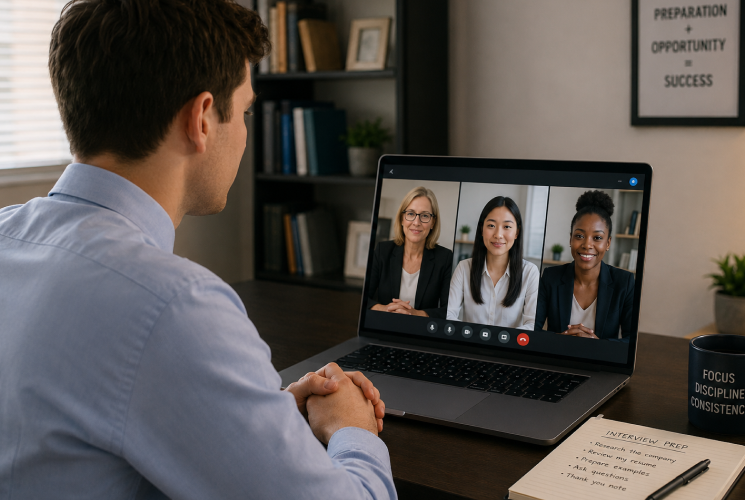
The Psychology of Dressing Up
There is a psychological phenomenon known as “enclothed cognition.” It suggests that the clothes you wear influence your psychological processes. Put simply, when you dress like a professional, you feel like a professional.
Wearing sweatpants might be comfortable, but they put you in a relaxation mindset. Putting on a crisp shirt or a blouse shifts your brain into work mode. This shift affects your posture, your tone of voice, and your confidence level.
When you dress for success, you aren’t just impressing the hiring manager; you are giving yourself a mental edge. You sit taller. You speak with more authority. You feel ready to tackle difficult questions.
Decoding the Dress Code: Company Culture Matters
Before you pull out your best suit, pause for a moment. Not every interview requires a tie or a blazer. The goal is to look like you already belong at the company.
Research the Vibe
Start by investigating the company’s culture. Look at their “About Us” page on their website. Scroll through their LinkedIn photos or Instagram feed. What are the employees wearing in candid office shots?
- Corporate/Finance/Law: If the current employees are in suits, you should be too. Aim for business formal attire: a suit jacket, a button-down shirt, or a professional blouse.
- Creative/Tech/Startups: These industries often lean towards business casual. A smart sweater, a polo shirt, or a nice blouse is appropriate. Wearing a full suit might actually make you look out of touch or like a poor cultural fit.
- Retail/Service/Blue Collar: Aim for “smart casual.” You want to look tidy and put-together, even if the daily uniform is more relaxed. A clean, collared shirt is always a safe bet.
When in Doubt, Level Up
If you can’t determine the dress code, the golden rule is to dress one level up from what you think the daily attire is. It is always better to be slightly overdressed than underdressed. Being overdressed shows you are making an effort. Being underdressed suggests you don’t care.
What to Wear: The Do’s and Don’ts of Camera-Ready Style
Webcams are notoriously unflattering. They flatten images, distort colors, and struggle with high contrast. What looks good in a mirror might look terrible on Zoom. Here is how to navigate the technical side of dressing up.
DO: Choose Solid Colors
Solid colors are your best friend on camera. They read clearly and don’t distract the eye.
- Blues: Navy, royal blue, and soft blues are universally flattering and convey trustworthiness and calm.
- Neutrals: Gray, charcoal, and soft creams work well.
- Rich Tones: Emerald green or deep burgundy can add a pop of personality without being overwhelming.
DON’T: Wear Distracting Patterns
Avoid busy patterns like tight stripes, checks, or intricate houndstooth. On camera, these patterns can cause a “moiré effect,” where the lines appear to vibrate or dance on the screen. It is distracting for the interviewer and can even cause eye strain.
DO: Pay Attention to Contrast
Avoid wearing stark white or pitch black if you can help it.
- White: A bright white shirt can blow out the camera’s exposure, making you look like a glowing ghost. If you wear white, put a jacket or cardigan over it to break up the brightness.
- Black: Black can sometimes appear as a shapeless blob on camera, absorbing all the light. Charcoal or navy often reads better than pure black.
DON’T: Blend Into Your Background
Consider where you are sitting. If you have a white wall behind you and you wear a white shirt, you will look like a floating head. If you have a dark bookshelf behind you, a dark jacket might make you disappear. Choose a color that contrasts enough with your background to separate you from the wall.
The “Waist-Up” Trap: Why Bottoms Still Matter
We have all heard the jokes about news anchors wearing shorts under their desks. In a virtual interview, you might be tempted to wear a nice shirt with pajama bottoms.
Resist this temptation.
First, refer back to the psychological boost of dressing fully. You won’t feel fully professional in fuzzy slippers.
Second, you never know what might happen. You might need to stand up to adjust a window blind, close a door, or retrieve a document. If you stand up and reveal baggy sweatpants or boxers, the interview is effectively over. Wear real pants. Jeans, chinos, or a skirt—anything that you would wear to leave the house is sufficient.
Grooming and Accessories
Your clothes are only half the equation. Your overall presentation includes your grooming and accessories.
Keep Jewelry Simple
Large, dangling earrings or stacked bracelets can be noisy. If your jewelry clanks every time you move your hands or nod your head, it will be picked up by the microphone. Stick to simple studs or a watch. You want the interviewer focused on your answers, not your accessories.
Glasses Glare
If you wear glasses, be mindful of reflection. Your computer screen can reflect in your lenses, obscuring your eyes.
- Tip: Adjust your screen brightness or the angle of your light source. You want the interviewer to see your eyes, as eye contact is crucial for building connection.
Hair and Face
You don’t need professional makeup or a salon blowout, but you do need to look neat.
- Make sure your hair is pulled back or styled away from your face so you aren’t constantly brushing it aside.
- Check your lighting. Good lighting acts like natural makeup. Position a light source in front of you (like a window or a ring light) to illuminate your face evenly. Avoid backlighting, which turns you into a silhouette.
The Tech Rehearsal: The Mirror Test
Do not wait until five minutes before the interview to check your look. Do a dry run the day before.
Open your webcam or the video software you will be using (Zoom, Teams, Google Meet). Record a short clip of yourself speaking.
Watch it back and ask yourself:
- Does my shirt look wrinkled?
- Is the color washing me out?
- Is my neckline appropriate? (Camera angles can sometimes make necklines appear lower than they are in real life).
- Can I see my eyes clearly?
This “tech rehearsal” allows you to fix issues before the pressure is on. You might realize your favorite green shirt clashes with the plant behind you, or that your glasses are reflecting your ring light. Fix it now so you don’t worry about it later.
Comfort is King (Sort of)
While you want to look professional, you also need to breathe. If your blazer is so tight you can’t move your arms, or your collar is choking you, you will look stiff and uncomfortable.
Fidgeting is amplified on camera. If you are constantly tugging at your clothes or shifting in your seat because your waistband is digging in, the interviewer will notice. They might interpret your physical discomfort as nervousness or lack of confidence.
Choose clothes that fit well. Test sitting down in them. Ensure you can gesture naturally without seams popping or fabric bunching up.
Final Checklist for Interview Day
You’ve done the prep. It’s almost time to log on. Use this final checklist to ensure your appearance is flawless.
- Check for stains: Even a small coffee spot can be visible on HD webcams.
- Lint roll everything: Especially if you have pets. Dark blazers are magnets for pet hair.
- Check your teeth: Do a quick mirror check to ensure your lunch isn’t stuck in your smile.
- Sit up straight: Your posture is part of your “outfit.” Shoulders back, chin up.
- Smile: It is the best accessory you have.
Conclusion
Dressing for a virtual interview is about removing distractions. You want the interviewer to focus entirely on your skills, your experience, and your personality. By choosing an outfit that is professional, appropriate for the company culture, and technically friendly for the camera, you remove visual friction.
You are signaling that you are a professional who pays attention to detail. You are showing that you respect the process. And most importantly, you are giving yourself the confidence boost you need to land the job.
So, put on the blazer. Wear the real pants. Check your lighting. When you look the part, you are one step closer to getting the part.
Ready for your next career move? Check out our latest job listings or read more about mastering the interview process on our blog.